Unity Plugin for Codex: install, connect, and call a Skill
Where to find Unity's official plugin for Codex, how to install it from the plugin directory or two terminal commands, how to approve the MCP connection to an open Unity 6 editor, and how Unity CLI differs from the plugin.
TL;DR: 3 steps
The Unity Plugin for Codex fits a Unity 6 project where Codex should write code against the current API instead of against a decade of forum answers. Unity publishes it under its own name, and the 31 Skills inside are written by the Unity teams that own each feature. Install it from the Codex plugin directory or from two terminal commands, approve the MCP connection inside the editor, then name a Skill when asking for work. Requires Unity 6 or later.
Step 1: Find and install the plugin
Two routes reach the same plugin.
In the Codex sidebar, open Plugins, search for Unity, and install from the directory entry published by Unity Technologies.
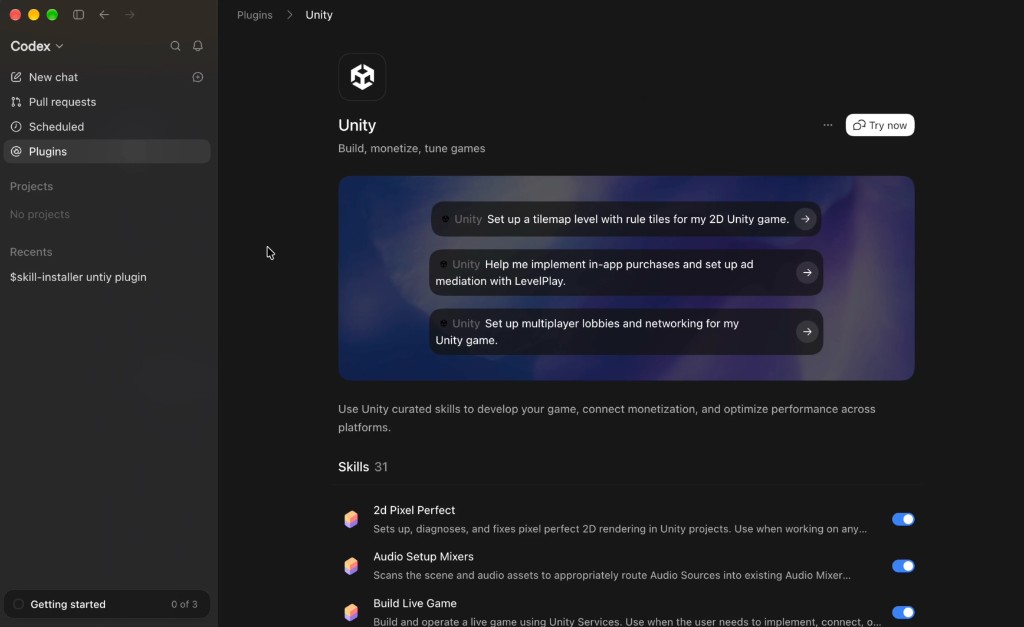
From a terminal, the same install is two commands:
codex plugin marketplace add Unity-Technologies/unity-agent-plugin
codex plugin add unity@unity-agent-plugin
The repository is Unity-Technologies/unity-agent-plugin, licensed under the Unity Companion License. Claude Code installs from the same repository with /plugin install unity@unity-agent-plugin.
This is not an Asset Store package, and Package Manager inside the editor will not find it. The current release is 0.1.6-beta; later versions arrive through codex plugin marketplace upgrade unity-agent-plugin, so there is nothing to copy between machines and no per-project configuration.
Start a new Codex session and type /unity: to confirm the Skills list loaded.
Step 2: Approve the MCP connection in the editor
Open the Unity 6 project first. Everything below operates on a running editor.
In Unity, go to Edit → Project Settings → AI → Unity MCP and check that the Bridge reads Running. The first request from Codex lands under Pending Connections and stays there until Accept is chosen inside the editor. Transport is local IPC, so project source does not leave the machine.
Two panels are easy to confuse. The official plugin uses the MCP Bridge built into the Unity editor. The Unity MCP covered separately on this site is its own service window on port 6594, with one-click setup for Cursor and Codex. Both run locally; they are not the same panel. For how the channel itself works, see How MCP Connects AI Coding Tools to Game Engines.
Once the connection is approved, the current scene, GameObjects, and Console logs can be read and changed from the session.
Step 3: Name a Skill when asking for work
Skills are invoked by name, as slash commands. Asking for “a settings screen” without naming one leaves the framework choice open, which is how a uGUI project ends up with UI Toolkit code that has to be unwound later.
Start with the router and let it detect the project:
/ui build a settings screen with audio sliders and a back button
/ui reads which UI system the project already uses, then hands off to /ui-uitk, /ui-ugui, or /ui-imgui. The same pattern applies elsewhere: /migrate-birp-to-urp for a Built-in to URP move, /manage-sprite-atlas for atlas packing, /optimize-text-mesh-pro for CJK glyphs rendering as boxes, /implement-in-app-purchases for Unity IAP.
All 31 Skills, grouped by the job they fit: A detailed introduction to Unity Skills in Codex.
Unity CLI and the plugin are not the same thing
This comes up often enough to state plainly.
Unity CLI is an interface. It reaches the engine from a terminal—installing Editors, creating and opening projects, managing packages and licenses, running builds and tests, reading logs. Any agent, or a person, can call it. Unity shipped it at Unite Seoul, before either plugin.
The plugin supplies instruction. Each Skill describes how one Unity job is meant to be done, so Codex checks the project, uses the current API, and verifies the result before reporting back. Without that, a general coding agent answers from the average of everything written about Unity, much of it against engine versions that no longer ship.
The two meet inside the plugin: unity-cli is itself one of the 31 Skills, the one that teaches Codex how to drive the CLI. Installing the plugin does not replace the CLI, and using the CLI does not give an agent Unity’s guidance for the task at hand.
What still sits outside both
Skills cover how code is written once a project is open. Batch preparation of generated UI art—cutting a composite plate on detected edges, exporting named files into Assets/Textures and Assets/Prefabs, keeping layer context in sync—happens before that point, and is not in the Skills list. See The Unity Codex Plugin: Engine-Side Skills Work, Batch UI Art Still Needs Another Pass.